Shopware 6.7.x · Version 2.0.15 · MIT
Manage InPost shipping inside Shopware
This free InPost Shopware plugin for Shopware 6.7 connects your store to the InPost ShipX API in Poland. Customers select Paczkomaty (InPost parcel lockers) or pickup points directly at checkout. Your team creates parcel locker and courier shipments, downloads PDF labels and checks tracking in the Shopware order view.
Features
From pickup point selection to printing a shipping label, work within your existing Shopware order process.
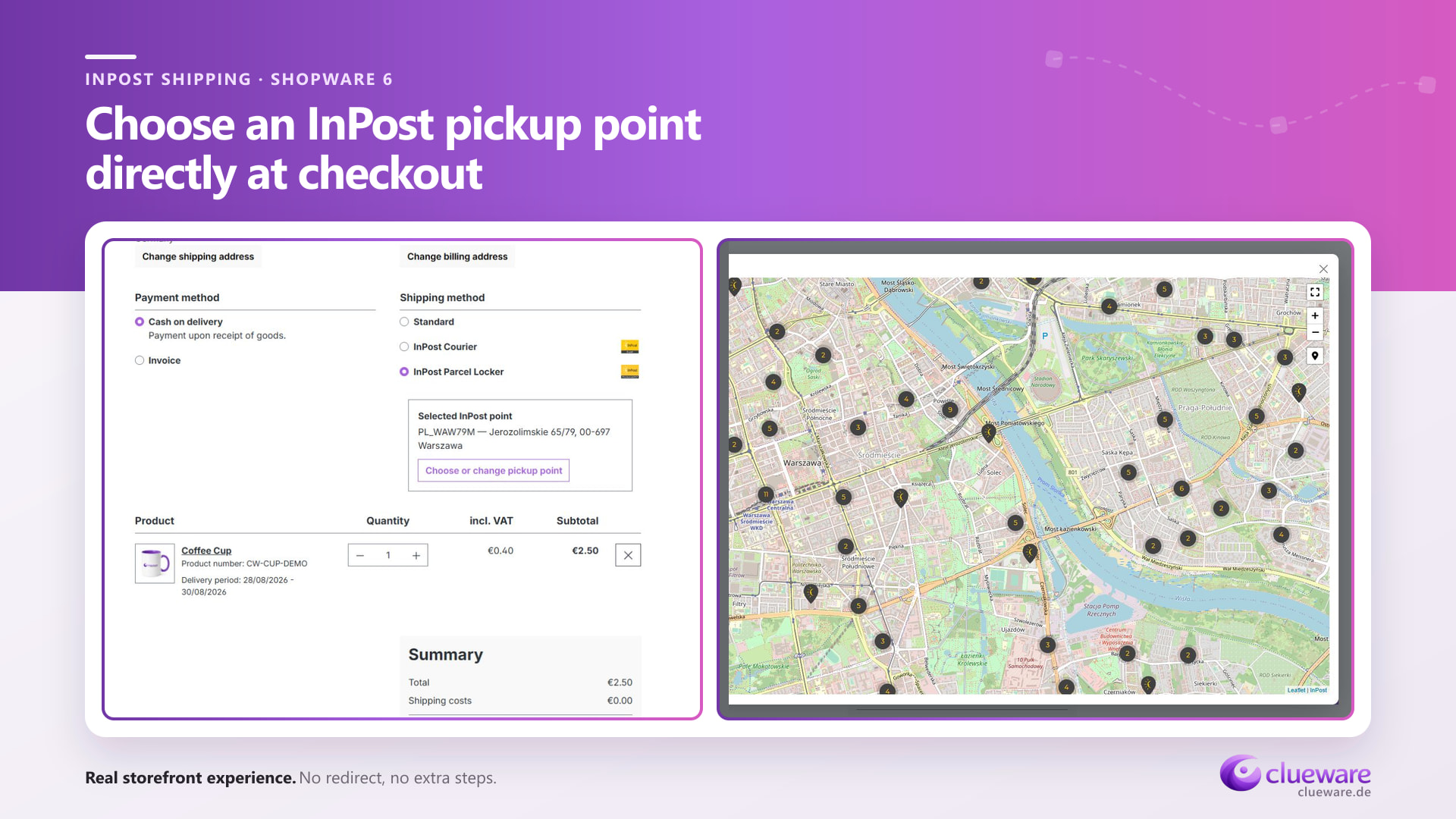
Paczkomaty and pickup points at Shopware checkout
Customers choose a Paczkomat (InPost parcel locker) or pickup point on the Geowidget map. The plugin validates the selection on the server and stores it with the Shopware order.
Pickup point or courier delivery
The plugin adds shipping methods for InPost parcel lockers and courier delivery. You can enter parcel dimensions manually for courier shipments and configure the services and default parcel settings.
InPost shipping labels and shipment tracking
Create individual shipments from the Shopware order view. Download PDF shipping labels in A6 or A4 format, open tracking and refresh shipment status. Shipment cancellation is available for eligible InPost statuses.
ShipX and Geowidget per sales channel
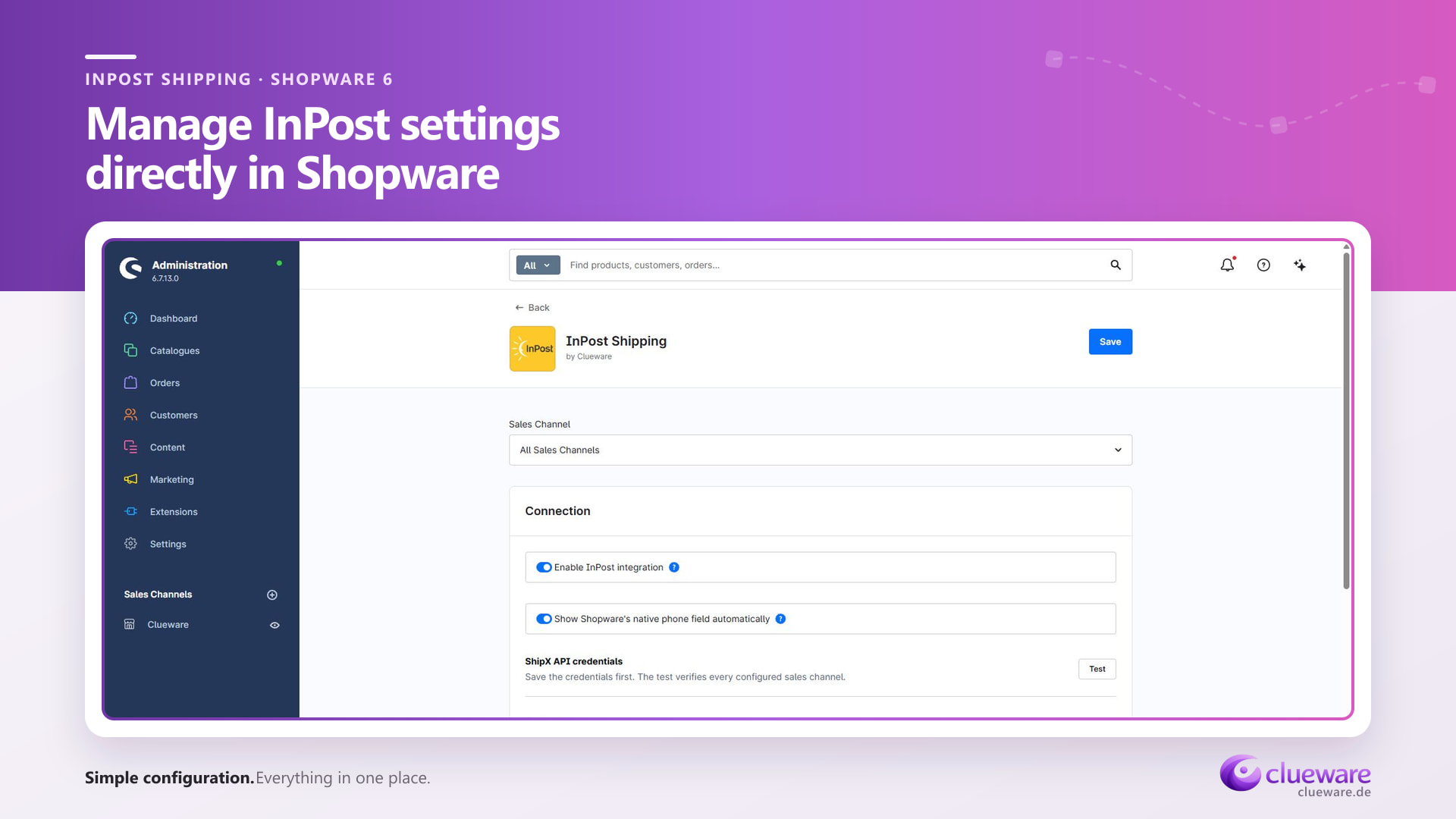
Configure ShipX credentials, a Geowidget token and shipping defaults per sales channel. Choose sandbox or production, save your settings and use the connection test to check access to the configured ShipX organizations.
Weight, cash on delivery and team permissions
Automatic weight calculation, parcel-size suggestions and cash on delivery support help with day-to-day shipment preparation. Dedicated Administration permissions and an operation log support your team's shipping workflow.
What you need to get started
- A self-hosted Shopware 6.7.x installation with Core, Storefront and the PHP environment required by your Shopware version.
- An existing Shopware shipping method with an assigned delivery time, used as the installation reference.
- Your own InPost ShipX account in Poland, a private API token and an organization ID.
- A public Geowidget token bound to your storefront domain for pickup point selection.
Install and configure the InPost plugin
- Download the installation package
Download CluewareInpostShipping-2.0.15.zip from GitHub Releases. This ZIP contains the plugin and its compiled Storefront and Administration assets.
- Install it in Shopware
Open Extensions → My extensions, upload the ZIP, then install and activate InPost Shipping.
- Review the shipping methods
Before enabling the integration, review shipping prices, delivery times and availability rules. The newly created InPost methods initially have a shipping price of 0. Set the prices appropriate for your store.
Configure ShipX and Geowidget
- Save credentials and shipping defaults
Select the sales channel and sandbox or production environment. Enter the private ShipX token and organization ID, plus the public Geowidget token for pickup points. Set services, map countries, label format and parcel defaults.
- Enable the integration and check the workflow
Enable and save the integration for the intended sales channel. The plugin synchronizes shipping-method assignments. Run the ShipX test to check organization credentials across configured channels, and check Geowidget selection separately at checkout.
Built for individual InPost shipments
Shipment management uses the InPost Poland ShipX API. Countries displayed in Geowidget do not automatically confirm the availability of corresponding shipping services through your ShipX account. Bulk operations, return workflows, multiple parcels per shipment and courier pickup requests are outside the current scope.
Credentials and shipment data
The private ShipX token stays on the server. Creating a shipment sends the recipient and shipment data needed for delivery to InPost. Geowidget uses a separate public token.
InPost Shopware plugin questions
Is the InPost Shopware plugin free?
Yes. Clueware provides the source code and installation package under the MIT license, so you can use and modify the plugin. You need your own InPost account for shipping, and InPost handles the charges for its shipping services.
What are Paczkomaty and how do customers select one?
Paczkomaty is the Polish name for InPost parcel lockers; a single locker is called a Paczkomat. Customers select a locker or pickup point using Geowidget directly at Shopware checkout. The chosen point is validated and saved with the order.
Which Shopware versions does this release support?
Version 2.0.15 targets Shopware 6.7.x with Core and Storefront. Its Composer constraint, ~6.7.0, permits versions from 6.7.0 up to, but excluding, 6.8.0.
Does the plugin support InPost in every country?
Shipment operations use InPost ShipX in Poland. Geowidget can display the countries selected in configuration. The shipments you can create depend on your ShipX account and its available services.
Are bulk shipping, returns and courier pickups included?
This release handles individual shipments. Bulk operations, return workflows, multiple parcels per shipment and requests for a courier pickup are not included.
An independent integration maintained by Clueware. Shopware and InPost names and logos belong to their respective owners.